WebPro Education

Tech tips everyday
Menu
  • REVIEWS
  • HOW TO
  • TECH NEWS
  • About Us
Home
explained
Gmail Tip: Every Email Has a Unique Email ID
explained

Gmail Tip: Every Email Has a Unique Email ID

Chris Muniu November 20, 2018

Did you know the Gmail treats individual Emails like independent entities and assigns each email sent over the service a unique identifier; An email ID. The email ID is generated when someone is composing the Email. The Email ID is the same even in the account of the person it was sent to.

The Email ID is not used much by Gmail users. It’s used by the Gmail service itself.  We normally identify Emails by their contents. But the Gmail ID can be used to help search for emails in rare cases where the search parameters fail to locate the Email.

To find the email Id of any email, open any message in Gmail, then click on the Email menu (the three dots in the upper right side of the Email). Choose ‘show original’.  This will open a new tab with the details of that Email.
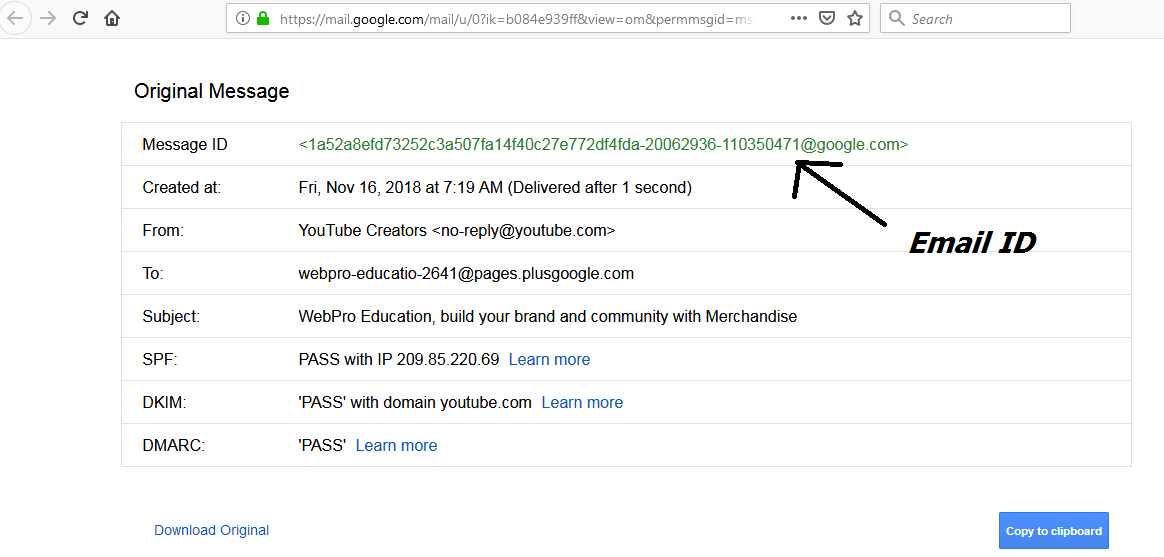
email id


At the top, is the Message ID. It’s usually a long string of alphanumeric characters. That’s your email ID. In case of a lost email or dispute, Email ID is used to track an email from account to account.

There’s no way to tell how you would use the Email unique identifier in day to day activities but there’s no harm in knowing how to find it.

Share
Tweet
Linkedin
Reddit
Tumblr
Stumble
Whatsapp
Telegram
Email
Prev Article
Next Article

Related Articles

iPhone Charge Gate Explained!
In the wake of Apple’s newest 2018 flagships, there was …

iPhone Charge Gate Explained!

LED Light Bulbs: What are The Advantages Over Conventional Light Bulbs?
The lighting industry has advanced tremendously since we started using LED

LED Light Bulbs: What are The Advantages Over Conventional Light Bulbs?

  • How To Update Samsung Galaxy Tab A11
  • How To Open Keyboard Settings On Samsung Galaxy Tab A11
  • How To Factory Reset Samsung Galaxy Tab A11
  • How To Enable & Disable Picture In Picture Mode On Samsung Galaxy Tab A11
  • How To Clear Cache Partition On Samsung Galaxy Tab A11
DMCA.com Protection Status

Associates Disclosure

WebPro Education is a participant in the Amazon Services LLC Associates Program, an affiliate advertising program designed to provide a means for sites to earn advertising fees by advertising and linking to amazon.com.

WebPro Education

Tech tips everyday
Copyright © 2025 WebPro Education

Ad Blocker Detected

Our website is made possible by displaying online advertisements to our visitors. Please consider supporting us by disabling your ad blocker.

Refresh