WebPro Education

Tech tips everyday
Menu
  • REVIEWS
  • HOW TO
  • TECH NEWS
  • About Us
Home
how to
How To Turn Narration ON / OFF In FC 27
how to

How To Turn Narration ON / OFF In FC 27

Erick Wachira September 22, 2026

Narration can read certain menu items and on-screen options aloud, which can be useful for accessibility but may be distracting if you prefer to navigate the game silently.

If you want to control the spoken narration throughout the game, you can easily enable or disable this feature through the accessibility settings.

In this guide, we’ll show you how to turn Narration ON or OFF in FC 27.

Read: How To Enable / Disable Stadium Shadows In FC 27

Turn Narration ON or OFF In FC 27

Launch FC 27 and wait for the main menu to appear. From the main menu, flick the analog stick to the left and select Accessibility.
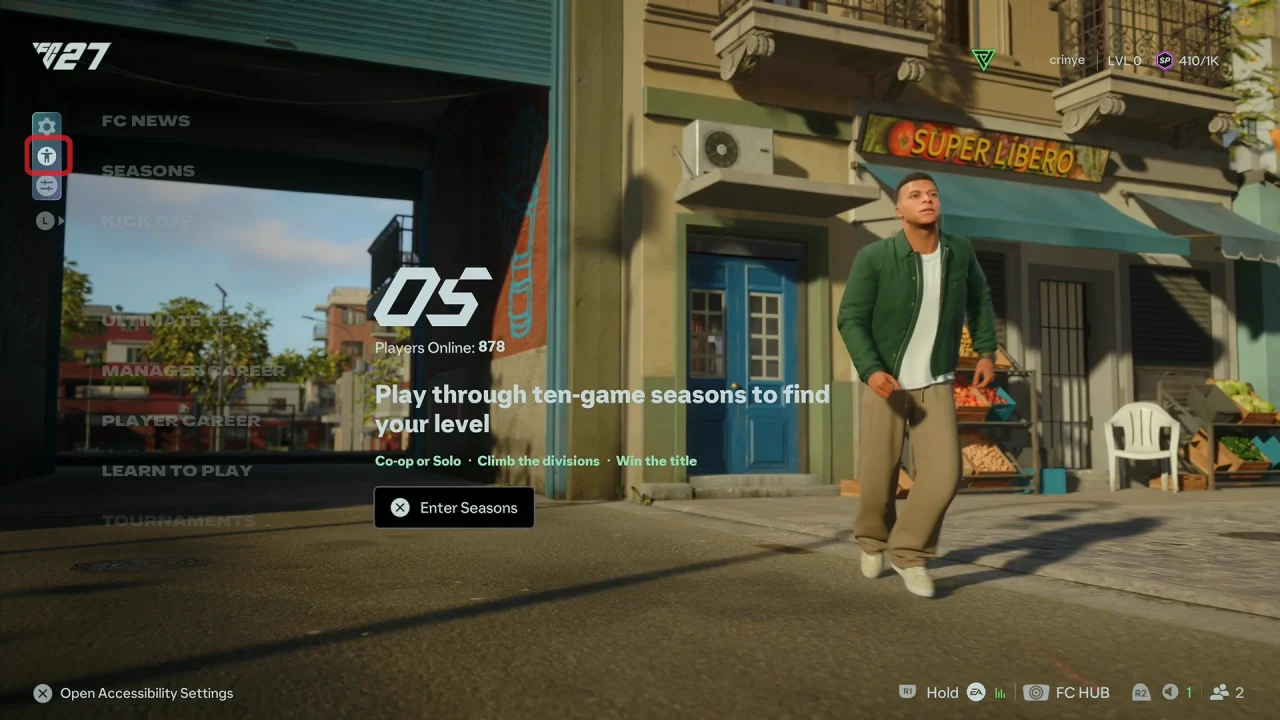
Accessibility Settings In FC 27

Use R1 or L1 to navigate to the Audio section and look for the Narration option.
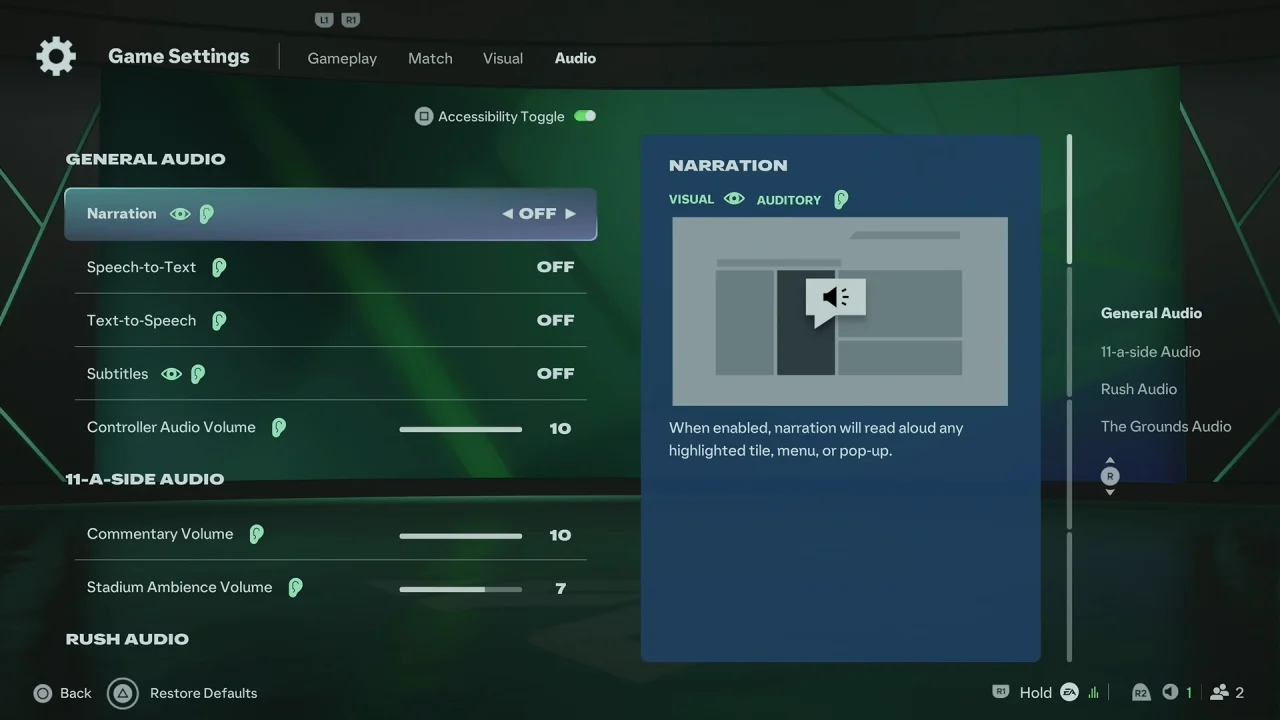
How To Turn OFF Narration In FC 27

Select the Narration setting and choose ON or OFF, depending on your preference.
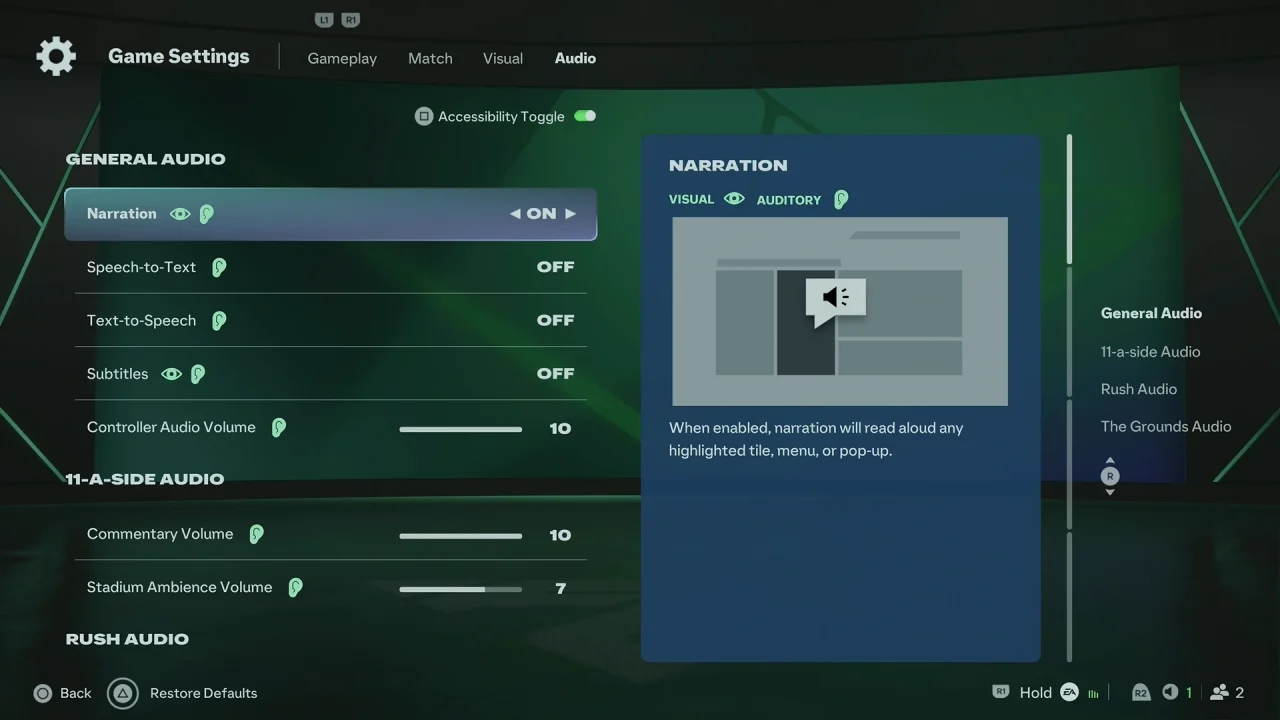
How To Turn ON Narration In FC 27

Your changes should be applied automatically.

What Does Narration Do In FC 27?

Narration is an accessibility feature that provides spoken descriptions or reads certain interface elements aloud as you navigate through FC 27. It can make menus and other parts of the game easier to navigate for players who benefit from audio assistance.

If you find the spoken narration unnecessary or distracting, you can disable it using the same settings menu.

How To Turn Narration Back ON

If you previously disabled narration and want to enable it again, simply go back to Settings > Accessibility, find the Narration option, and switch it back ON.

The setting can be changed whenever you want, so you can enable or disable narration depending on your needs.

Watch: Enable Stadium Shadows In FC 27

Share
Tweet
Linkedin
Reddit
Tumblr
Stumble
Whatsapp
Telegram
Email
Prev Article
Next Article

Related Articles

How To Enable ‘Swipe Down For Notifications Panel’ On Samsung Galaxy A35 5G

How To Enable ‘Swipe Down For Notifications Panel’ On Samsung Galaxy A35 5G

How To Make Them Automatically Pause Music / Media On Airpods Pro 3 When You’re Falling Asleep

How To Make Them Automatically Pause Music / Media On Airpods Pro 3 When You’re Falling Asleep

  • How To Change Referee Strictness In FC 27
  • How To Enable / Disable Voice Chat In FC 27
  • How To Perform Finesse Shot In FC 27
  • How To Turn Narration ON / OFF In FC 27
  • How To Enable / Disable Stadium Shadows In FC 27
DMCA.com Protection Status

Associates Disclosure

WebPro Education is a participant in the Amazon Services LLC Associates Program, an affiliate advertising program designed to provide a means for sites to earn advertising fees by advertising and linking to amazon.com.

WebPro Education

Tech tips everyday
Copyright © 2026 WebPro Education

Ad Blocker Detected

Our website is made possible by displaying online advertisements to our visitors. Please consider supporting us by disabling your ad blocker.

Refresh