WebPro Education

Tech tips everyday
Menu
  • REVIEWS
  • HOW TO
  • TECH NEWS
  • About Us
Home
how to
How To Enable iMessage On iPhone 18 Pro
how to

How To Enable iMessage On iPhone 18 Pro

Camerone September 23, 2026

If you have just purchased an iPhone 18 Pro and want to start using iMessage, enabling it is quick and easy. iMessage lets you send messages, photos, videos, and other content to Apple users over an internet connection.

In this guide, we’ll walk you through the step-by-step process on how to go about enabling iMessage on your iPhone 18 Pro.

Also Read: How To Reset iPhone 18 Pro

How To Enable iMessage On iPhone 18 Pro

First, open the Settings app on your iPhone 18 Pro. From the main Settings menu, scroll down and tap Apps. Next, select Messages. Look for the iMessage option near the top of the screen. Tap the switch next to iMessage to turn it on.
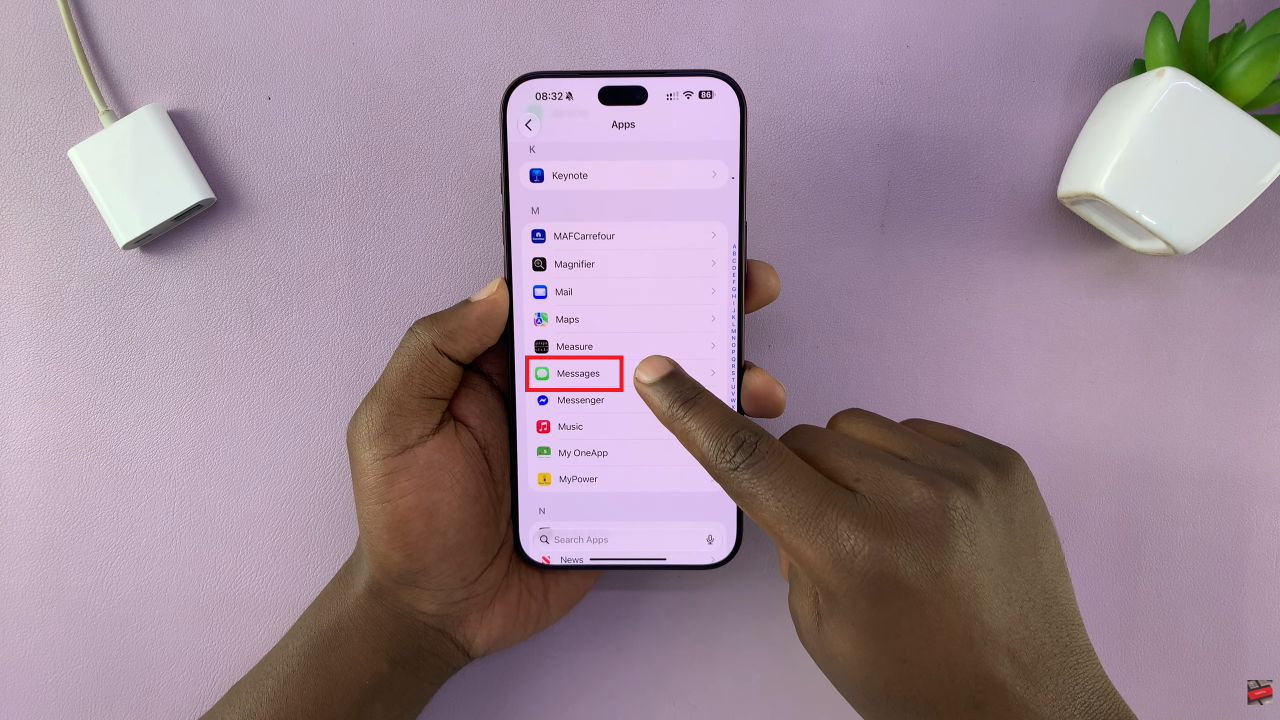
Enable iMessage On iPhone 18

After iMessage is enabled, you can check which phone numbers and email addresses can be used with the service. Tap Send & Receive and review the options under the section showing where you can receive iMessages and reply from. You can select your phone number, email address, or both, depending on your preferences.
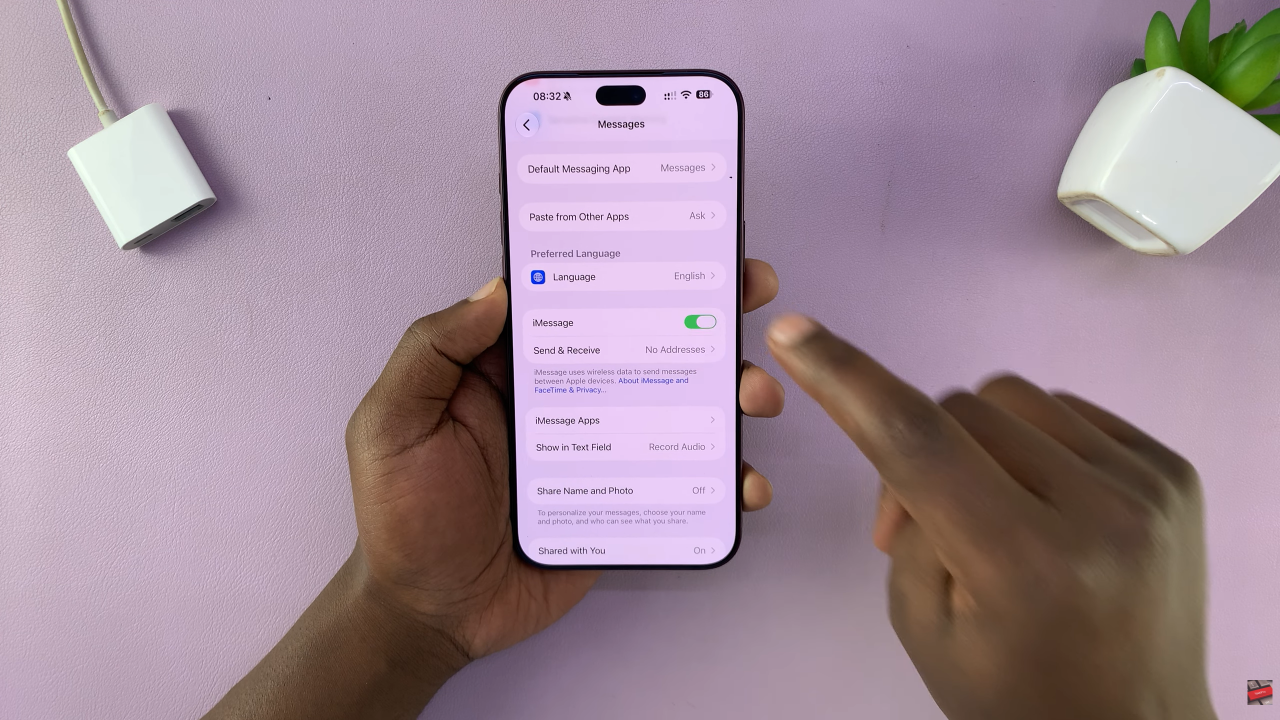
Enable iMessage On iPhone 18 Pro

Enabling iMessage on the iPhone 18 Pro is quick and simple. Just go to Settings > Apps > Messages, turn on iMessage, and then check Send & Receive to make sure your preferred phone number or email address is selected. Once activated, you can enjoy iMessage features when communicating with other compatible Apple devices.
Watch: How To Turn ON iPhone 18 Pro / 18 Pro Max

Share
Tweet
Linkedin
Reddit
Tumblr
Stumble
Whatsapp
Telegram
Email
Prev Article
Next Article

Related Articles

How To FIX Screen Color On Samsung Galaxy A15

How To FIX Screen Color On Samsung Galaxy A15

How To Save Audio Recordings To Files App On Google Pixel 8

How To Save Audio Recordings To Files App On Google Pixel 8

  • How To Set Up eSIM On iPhone 18 Pro
  • How To Turn ON iPhone 18 Pro
  • How To Enable iMessage On iPhone 18 Pro
  • How To Perform Ball Roll In FC 27
  • How To Juggle Ball In FC 27
DMCA.com Protection Status

Associates Disclosure

WebPro Education is a participant in the Amazon Services LLC Associates Program, an affiliate advertising program designed to provide a means for sites to earn advertising fees by advertising and linking to amazon.com.

WebPro Education

Tech tips everyday
Copyright © 2026 WebPro Education

Ad Blocker Detected

Our website is made possible by displaying online advertisements to our visitors. Please consider supporting us by disabling your ad blocker.

Refresh