WebPro Education

Tech tips everyday
Menu
  • REVIEWS
  • HOW TO
  • TECH NEWS
  • About Us
Home
how to
How To Change Your Steam Account Name
how to

How To Change Your Steam Account Name

Catherine Kabaki August 29, 2020

An Account name in Steam is a numeric identifier and cannot be changed once you register your Steam account.

What you can change is your Profile name which is the name that appears at the top of your Steam account page and the one your gaming friends know you by.

How To Change Your Steam Account Name

To change it, log in to your Steam account as usual and click on your Profile name.

Click on the View Profile option in the drop down menu that appears. Now, click on Edit Profile and type your preferred new name over the existing one.
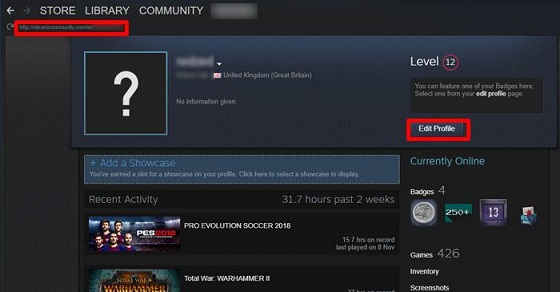
how to change your Steam account name

Next up, click on Save Changes at the bottom of the page to save the new name. That’s it.
Share
Tweet
Linkedin
Reddit
Tumblr
Stumble
Whatsapp
Telegram
Email
Prev Article
Next Article

Related Articles

How To Save Captured Photos & Videos Directly To SD Card On Samsung Galaxy A35 5G

How To Save Captured Photos & Videos Directly To SD Card On Samsung Galaxy A35 5G

How To Delete Home Screen Page On iPhone

How To Delete Home Screen Page On iPhone

  • How To Create Folder In MacBook Neo
  • How To Buy Agency On GTA Online
  • How To Purchase Facility On GTA V Online
  • How To Purchase Arcade On GTA V Online
  • How To Purchase Vehicle Warehouse On GTA Online
DMCA.com Protection Status

Associates Disclosure

WebPro Education is a participant in the Amazon Services LLC Associates Program, an affiliate advertising program designed to provide a means for sites to earn advertising fees by advertising and linking to amazon.com.

WebPro Education

Tech tips everyday
Copyright © 2026 WebPro Education

Ad Blocker Detected

Our website is made possible by displaying online advertisements to our visitors. Please consider supporting us by disabling your ad blocker.

Refresh