In this guide, we’ll show you how to change the camera settings in FC 27. Changing the camera settings in EA SPORTS FC 27 can make a big difference to how you see the pitch and control your players.
Whether you prefer a wider view of the field, a closer camera for a more immersive experience, or a custom setup, FC 27 gives you several camera options to adjust.
Watch: Find Practice Arena In FC 27
Change Camera Settings In FC 27
Launch FC 27 and enter the main menu. Choose the Settings icon and select Game Settings.
Navigate to the Visual tab. Here, you should see the Camera Options. You can now adjust the camera settings for different gameplay situations, depending on what you want to change.
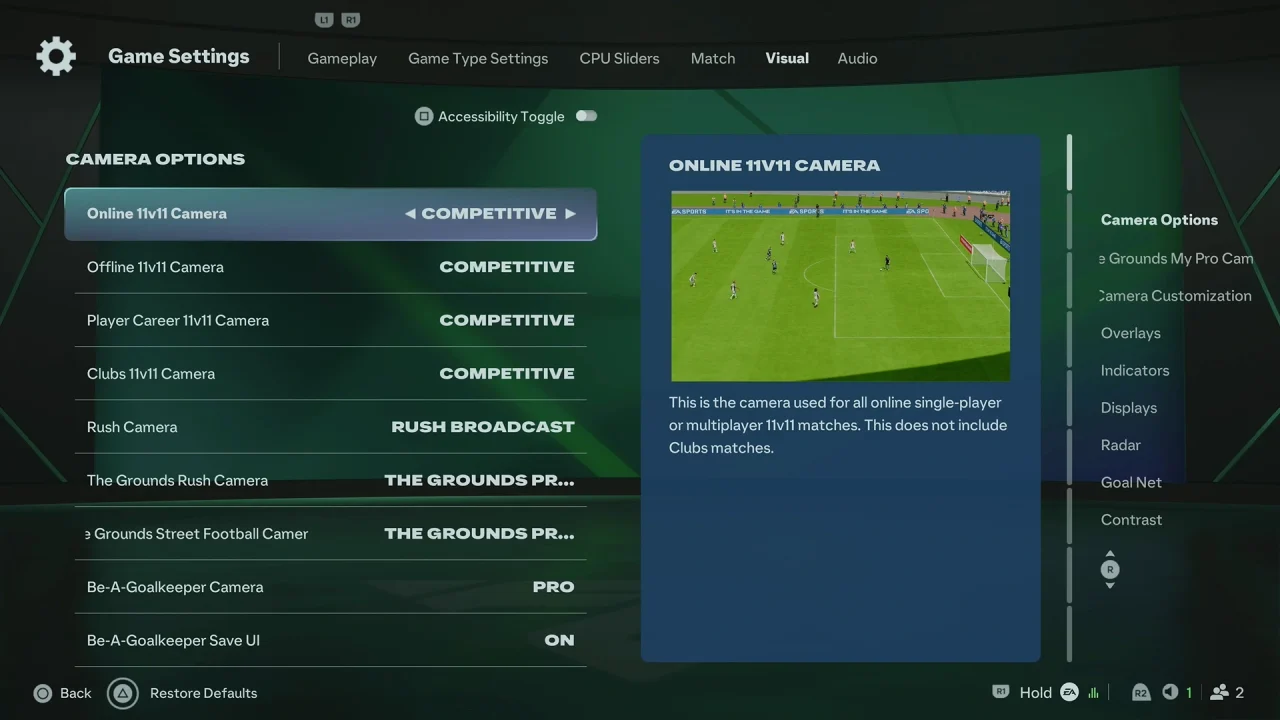
Choose your preferred Camera type, such as a broadcast-style or wider gameplay view. Adjust options such as Height and Zoom if they are available for the selected camera.
You can also modify other camera-related options, including Pro Camera Zoom, Pro Camera Speed, or other available settings.
Once you’re satisfied with the changes, back out of the menu to save your settings.
After changing the camera, it’s a good idea to enter a match or the Practice Arena and test the new view. Pay attention to how much of the pitch you can see and whether the camera makes passing, defending, and attacking easier.
If the camera feels too close, increase the camera height or reduce the zoom. If you prefer a more focused view, you can do the opposite.
Customize Your View
FC 27 allows you to experiment with different camera configurations, so there isn’t necessarily one setting that works for everyone. You may want a wider view for competitive matches or a closer camera for a more immersive experience.
If you don’t like your changes, simply return to the Camera settings and adjust them again until you find a setup that suits your playing style.