Learning how to join a friend’s session in GTA V Online is one of the best ways to experience the game. While GTA Online offers a massive open world filled with players, connecting directly with friends ensures a more coordinated, enjoyable, and often more successful gameplay experience.
In GTA Online, sessions can be public, private, or invite-only, and your ability to join a friend often depends on their current session type and privacy settings. This means that sometimes you may need an invite, while other times you can join directly through your friends list or the pause menu.
Additionally, factors like internet connection, game updates, and platform compatibility can affect how smoothly you’re able to join a friend’s session. This guide will walk you through everything you need to know about joining a friend’s session in GTA V Online.
Watch: How To Play Missions On GTA V Online
Join Friend’s Session In GTA V Online
To begin, open the pause menu and navigate to the Friends tab, where you can view a list of all your online friends. From there, carefully scroll through the list and select the friend you want to join.
Next, click on your friend’s name to open a dropdown menu with several interaction options. Then, simply select “Join Game” to connect to their session.
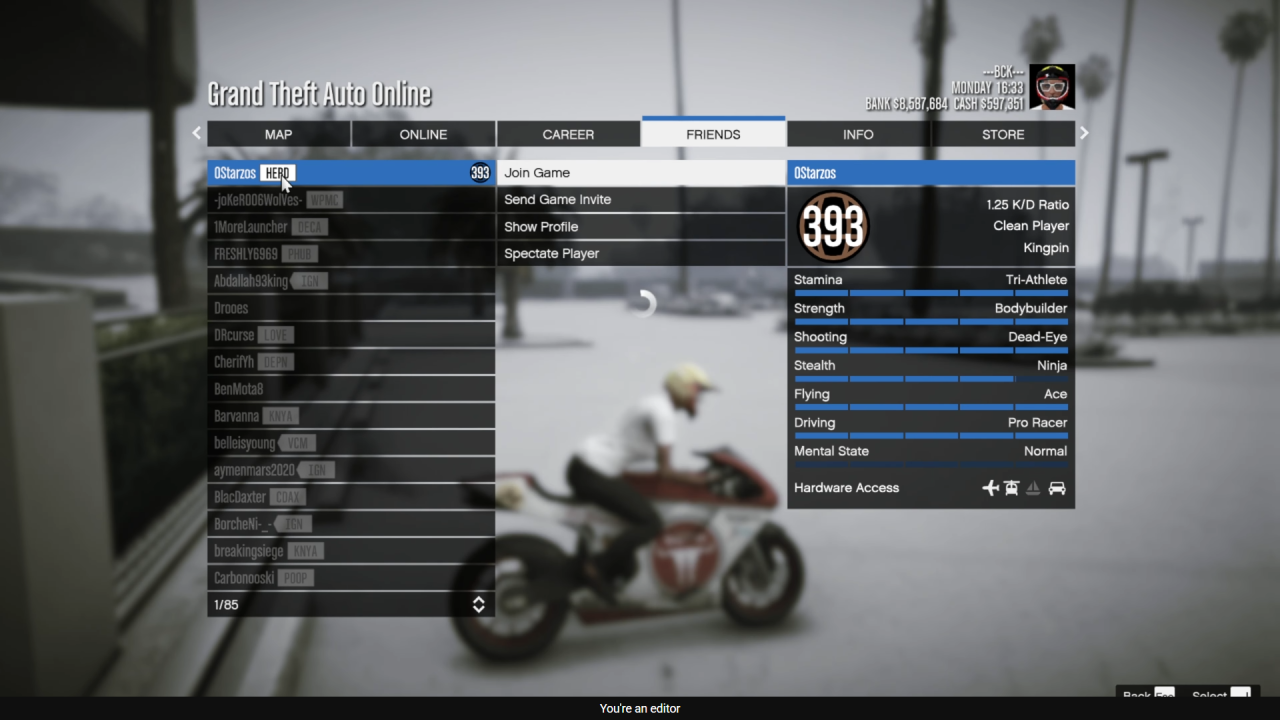
After that, the game will begin loading you into their lobby, allowing you to play together. If the option is unavailable, it may be due to their session settings or current activity, so you may need to wait or request an invite instead.