WebPro Education

Tech tips everyday
Menu
  • REVIEWS
  • HOW TO
  • TECH NEWS
  • About Us
Home
how to
How To Change Voice Recording Quality On Samsung Galaxy S26 Ultra
how to

How To Change Voice Recording Quality On Samsung Galaxy S26 Ultra

Edwin Njenga March 27, 2026

In this article, you’ll learn how to change voice recording quality on Galaxy S26 Ultra to improve the clarity and size of your audio recordings. Adjusting recording quality helps you get better sound for notes, interviews, or important conversations depending on your needs.

The Samsung Galaxy S26 offers built-in voice recording settings that allow you to choose different audio quality levels. Higher quality gives clearer sound, while lower quality saves storage space on your device.

By following a few simple steps, you will know how to change voice recording quality on Samsung Galaxy S26 Ultra and customize your recordings for the best balance between clarity and storage.

Watch: How To Remove eSIM From Samsung Galaxy S26 / S26 Ultra

Change Voice Recording Quality On Samsung Galaxy S26 Ultra:

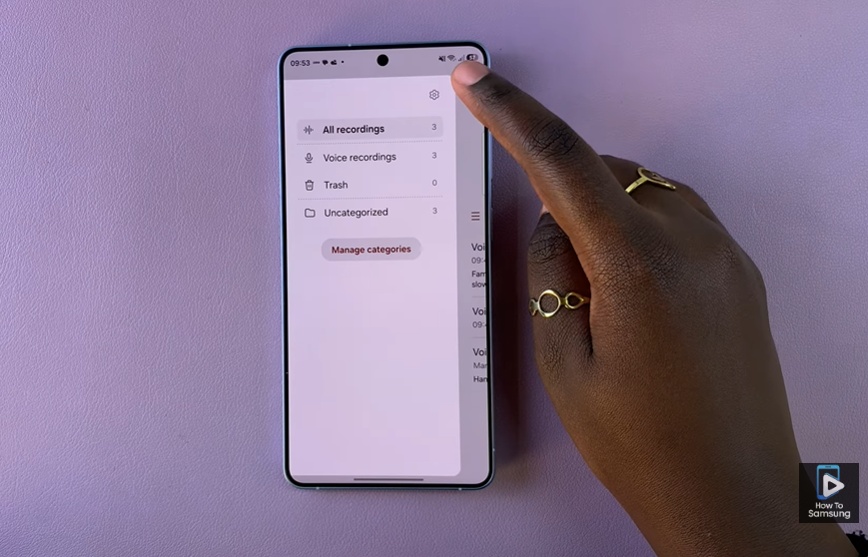
Open the Voice Recorder app on your Samsung Galaxy S26 Ultra. This app is used for creating, saving, and managing all your audio recordings such as notes, meetings, and personal reminders. Tap the Settings icon inside the app to open the recording configuration menu. This section contains important options that control how your voice recordings are captured and saved on your device.
How To Change Voice Recording Quality On Samsung Galaxy S26 Ultra

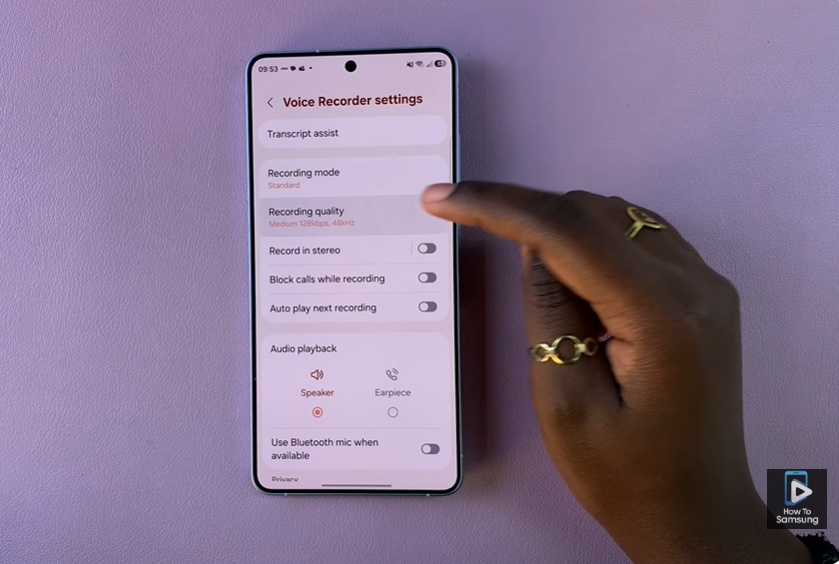
Select Recording Quality to see the available audio quality options. Depending on your device setup, you may find choices like high quality for clearer sound or standard quality for smaller file sizes.
How To Change Voice Recording Quality On Samsung Galaxy S26 Ultra

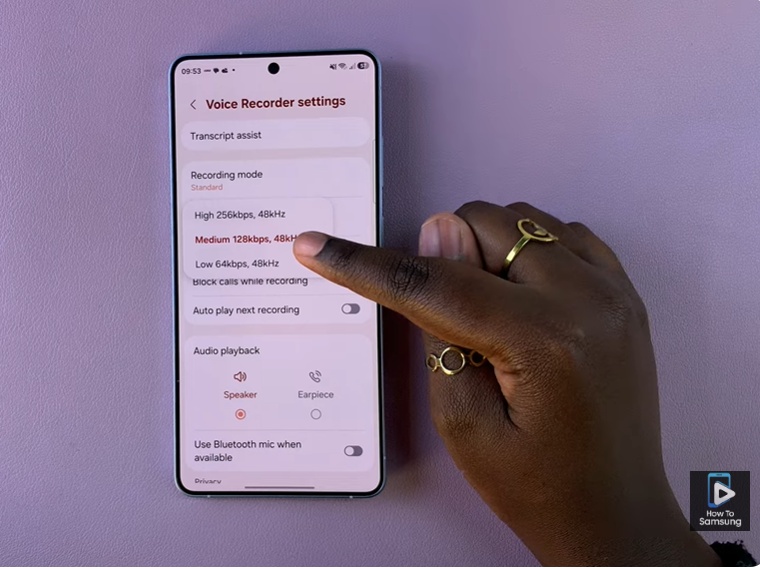
Choose your preferred recording quality level based on your needs, then confirm your selection. Once set, your Samsung Galaxy S26 Ultra will automatically record all future audio using the selected quality setting.
How To Change Voice Recording Quality On Samsung Galaxy S26 Ultra

Read: How To Scan Documents On Samsung Galaxy S26

Share
Tweet
Linkedin
Reddit
Tumblr
Stumble
Whatsapp
Telegram
Email
Prev Article
Next Article

Related Articles

How To Turn ON iPhone Without Buttons

How To Turn ON iPhone Without Buttons

How To Enable / Disable Data Saver On Samsung Galaxy A17 5G

How To Enable / Disable Data Saver On Samsung Galaxy A17 5G

  • How To Add Timestamps To Photos On Xiaomi Smart Camera C701
  • How To Turn ON Status Light Of Xiaomi Smart Camera C701
  • How To Turn ON Pet Detection On Xiaomi Smart Camera C701
  • How To Set Password On Xiaomi Smart Camera C701
  • How To Recover Deleted Voice Recordings On Samsung Galaxy S26 Ultra
DMCA.com Protection Status

Associates Disclosure

WebPro Education is a participant in the Amazon Services LLC Associates Program, an affiliate advertising program designed to provide a means for sites to earn advertising fees by advertising and linking to amazon.com.

WebPro Education

Tech tips everyday
Copyright © 2026 WebPro Education

Ad Blocker Detected

Our website is made possible by displaying online advertisements to our visitors. Please consider supporting us by disabling your ad blocker.

Refresh