WebPro Education

Tech tips everyday
Menu
  • REVIEWS
  • HOW TO
  • TECH NEWS
  • About Us
Home
how to
How To Tag (Mention) Someone In Instagram Story After Posting
how to

How To Tag (Mention) Someone In Instagram Story After Posting

Wairimu April 29, 2025

Instagram lets you tag or mention people even after your story is live. Whether you’re giving credit, tagging a friend, or collaborating with a brand, being able to add mentions after posting can save you time and fix those small mistakes.

In this guide, you’ll learn exactly how to tag someone in an Instagram Story after it’s posted, using Instagram’s built-in “Add Mentions” feature. Follow the simple steps below to make sure no one’s left out of your story mentions.

Read: How To Delete CapCut Project

How To Tag (Mention) Someone In Instagram Story After Posting

Launch the Instagram app and go to your profile.

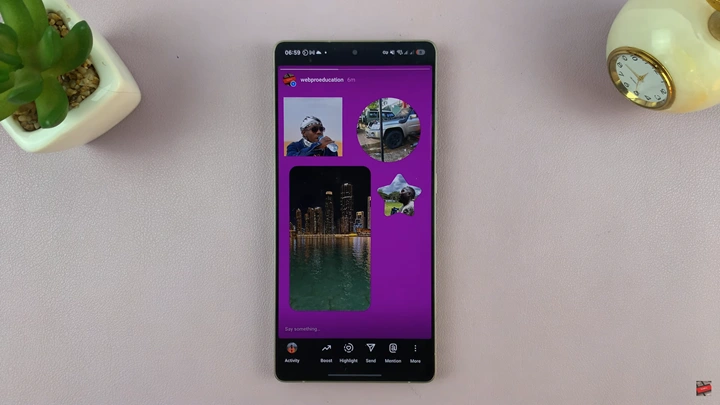
Tap on your currently active story (the one you want to edit).
How To Tag (Mention) Someone In Instagram Story After Posting

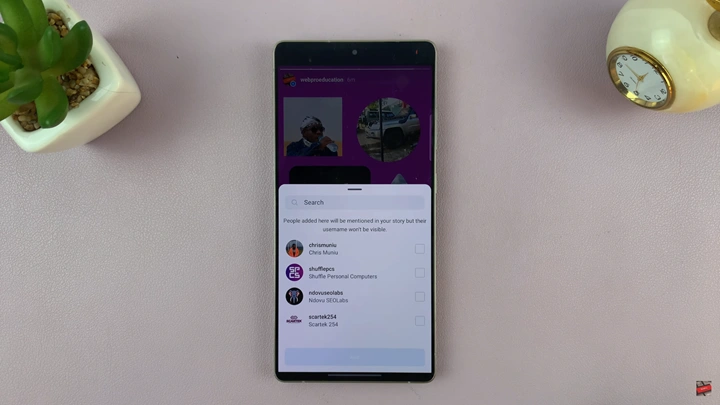
Tap on the @ (mention) icon that appears on the bottom right.
How To Tag (Mention) Someone In Instagram Story After Posting

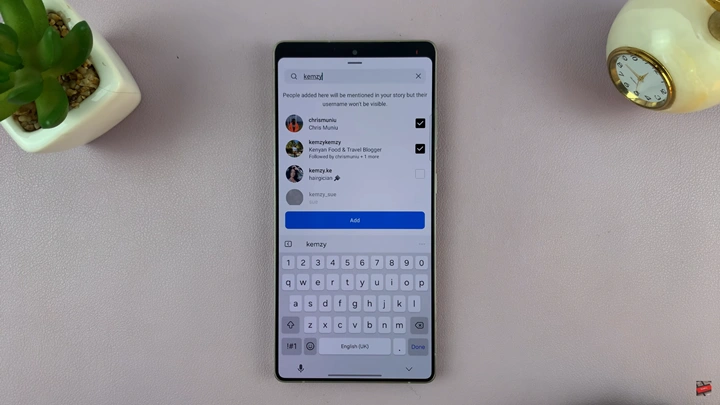
Begin typing the username(s) of the person or people you want to tag. Tap to select them.

Once you’ve selected all the users, tap “Add” to complete the tagging process.
How To Tag (Mention) Someone In Instagram Story After Posting

By following the steps above, you can ensure better engagement and visibility for your content even after it goes live. Whether you forgot to tag them originally or just decided to give them a shoutout later, Instagram’s “Add Mentions” feature makes it easy.

Watch: How To Delete CapCut Project
Share
Tweet
Linkedin
Reddit
Tumblr
Stumble
Whatsapp
Telegram
Email
Prev Article
Next Article

Related Articles

How To Set Alarm On Apple Watch

How To Set Alarm On Apple Watch

How To Download From SoundCloud
Different artists make their music files available in different formats …

How To Download From SoundCloud

  • How To Add Timestamps To Photos On Xiaomi Smart Camera C701
  • How To Turn ON Status Light Of Xiaomi Smart Camera C701
  • How To Turn ON Pet Detection On Xiaomi Smart Camera C701
  • How To Set Password On Xiaomi Smart Camera C701
  • How To Recover Deleted Voice Recordings On Samsung Galaxy S26 Ultra
DMCA.com Protection Status

Associates Disclosure

WebPro Education is a participant in the Amazon Services LLC Associates Program, an affiliate advertising program designed to provide a means for sites to earn advertising fees by advertising and linking to amazon.com.

WebPro Education

Tech tips everyday
Copyright © 2026 WebPro Education

Ad Blocker Detected

Our website is made possible by displaying online advertisements to our visitors. Please consider supporting us by disabling your ad blocker.

Refresh