WebPro Education

Tech tips everyday
Menu
  • REVIEWS
  • HOW TO
  • TECH NEWS
  • About Us
Home
how to
How To Enable / Disable Corner Kick Trajectory In FC 27
how to

How To Enable / Disable Corner Kick Trajectory In FC 27

Erick Wachira September 23, 2026

If you want more control over your corner kicks in FC 27, you can enable or disable the Corner Kick Trajectory option.

This setting controls whether a visual trajectory indicator appears to help you aim your corner kicks.

In this guide, we’ll show you how to find the setting and turn Corner Kick Trajectory ON or OFF.

Watch: Customize Controls In FC 27

Enable & Disable Corner Kick Trajectory In FC 27

As usual, start by launching FC 27 and go to the main menu. Open the Settings icon and select Game Settings.

Navigate to the Visual tab and look for Corner Kick Trajectory, under the Indicators section.
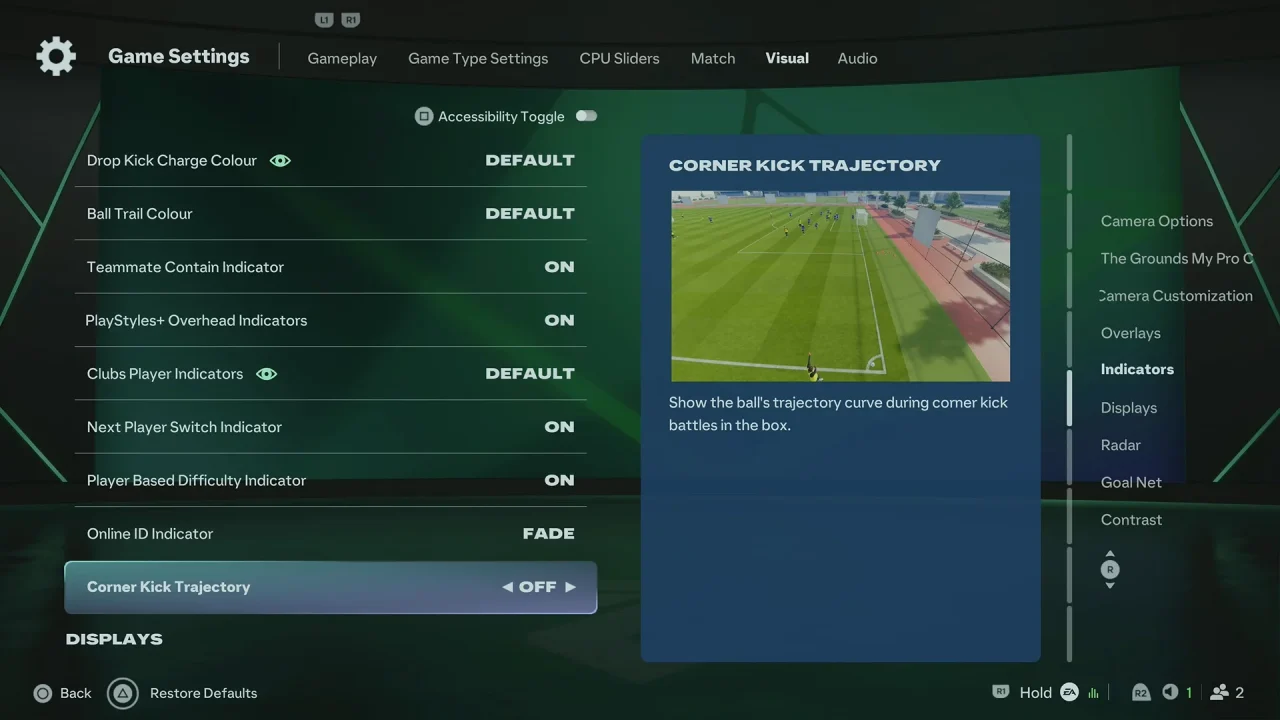
How To Enable / Disable Corner Kick Trajectory In FC 27

Highlight the option and choose ON or OFF. Return to the game to apply the change.

When Corner Kick Trajectory is enabled, FC 27 displays a visual guide that can help you understand the direction and path of your corner kick.

This can be particularly useful when learning how to take corners or when trying to improve your accuracy.

When disabled, the trajectory guide is removed, giving you a cleaner view and requiring you to rely more on your own aiming and timing.

Why Change This Setting?

You may want to enable Corner Kick Trajectory if you’re still learning how to take effective corner kicks or want additional visual assistance.

In the event that you prefer to disable it if you want a less cluttered interface or want to take corners without a visual aiming guide.

You can return to the same settings menu at any time to switch the option back.
Read: How To Customize Controls In FC 27

Share
Tweet
Linkedin
Reddit
Tumblr
Stumble
Whatsapp
Telegram
Email
Prev Article
Next Article

Related Articles

How To Enable RAM Plus On Samsung Galaxy A35 5G

How To Enable RAM Plus On Samsung Galaxy A35 5G

How To Switch Between Cameras While Video Recording On iPhone 15 & iPhone 15 Pro

How To Switch Between Cameras While Video Recording On iPhone 15 & iPhone 15 Pro

  • How To Play Online With Other Players In FC 27
  • How To End Matches In FC 27
  • How To Enable / Disable Power Shot Zoom In FC 27
  • How To Transfer Data From Old iPhone To iPhone 18 Pro
  • How To Enable / Disable Corner Kick Trajectory In FC 27
DMCA.com Protection Status

Associates Disclosure

WebPro Education is a participant in the Amazon Services LLC Associates Program, an affiliate advertising program designed to provide a means for sites to earn advertising fees by advertising and linking to amazon.com.

WebPro Education

Tech tips everyday
Copyright © 2026 WebPro Education

Ad Blocker Detected

Our website is made possible by displaying online advertisements to our visitors. Please consider supporting us by disabling your ad blocker.

Refresh