Read: How To Hard Reset Samsung Phone
To Enable / Disable Handball Rule In FC 27 can change the way you defend, attack, and manage crucial moments during a match. When enabled, players can be penalized for certain handball offenses, potentially resulting in free kicks, penalties, or other important decisions that can affect the outcome of a game.
If you prefer a more relaxed gameplay experience, disabling the Handball Rule can remove these situations and let you focus purely on the action. In this guide, we’ll show you how to turn handball rule on & off in FC 27.
Whether you’re looking for a more authentic football experience, experimenting with different gameplay settings, or simply want fewer interruptions during matches, adjusting this option can help you customize FC 27 to suit your preferred playstyle. Follow the steps below to change the Handball Rule setting quickly and easily.
Enable / Disable Handball Rule In FC 27
To Enable / Disable Handball Rule In FC 27, first, launch FC 27 and enter the main menu. Then, select Game Settings from the three buttons from the far left of the menu.

After that, look through the gameplay-related settings navigating to the right till you find ‘match’. While here scroll down until you find the ‘Handball’ option under ‘referee’ section.
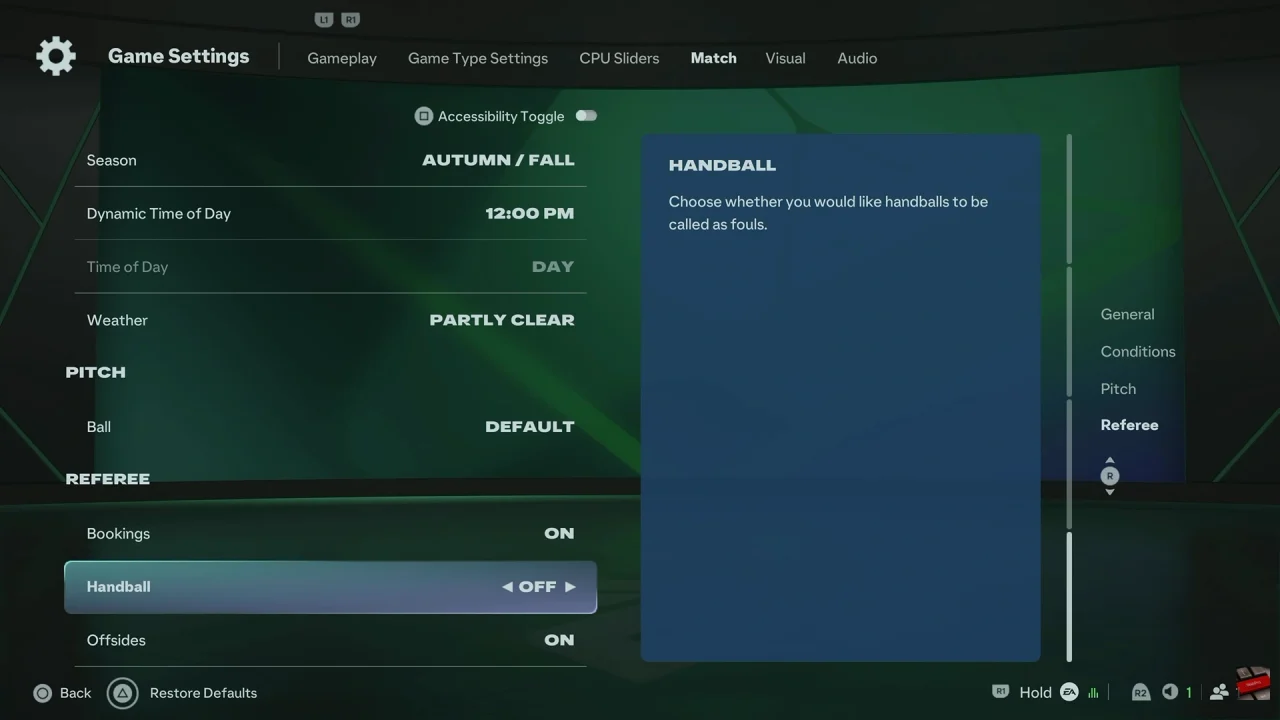
Then, choose On if you want handballs to be active during matches. This allows the game to apply handball decisions according to the selected rule. Alternatively, if you prefer to disable handballs, select Off. This prevents handball offenses from affecting your gameplay.
Finally, review your settings and return to your match. Your selected Handball Rule setting should now be applied. Therefore, you can repeat these steps whenever you want to switch between the two options and customize FC 27 to your preferred gameplay experience.
Watch: How To Reset Squads in FC 27