Watch: How To Purchase A Vehicle Warehouse On GTA Online
Learning how to buy an Arcade in GTA V Online is a key step in completing the Diamond Casino Heist and building a profitable criminal empire. Arcades not only serve as a front for your operations but also act as a central hub for planning high-stakes missions.
With the right location and setup, an Arcade can generate passive income while giving you access to one of the most rewarding heists in the game. However, unlike other properties, the Arcade does not produce high passive earnings on its own. Its gets value from enabling the Casino Heist and consolidating management of other illicit enterprises.
In this guide, you’ll learn everything you need to know about how to purchase an Arcade in GTA V Online and getting started on your path to bigger profits.
Purchase Arcade On GTA V Online
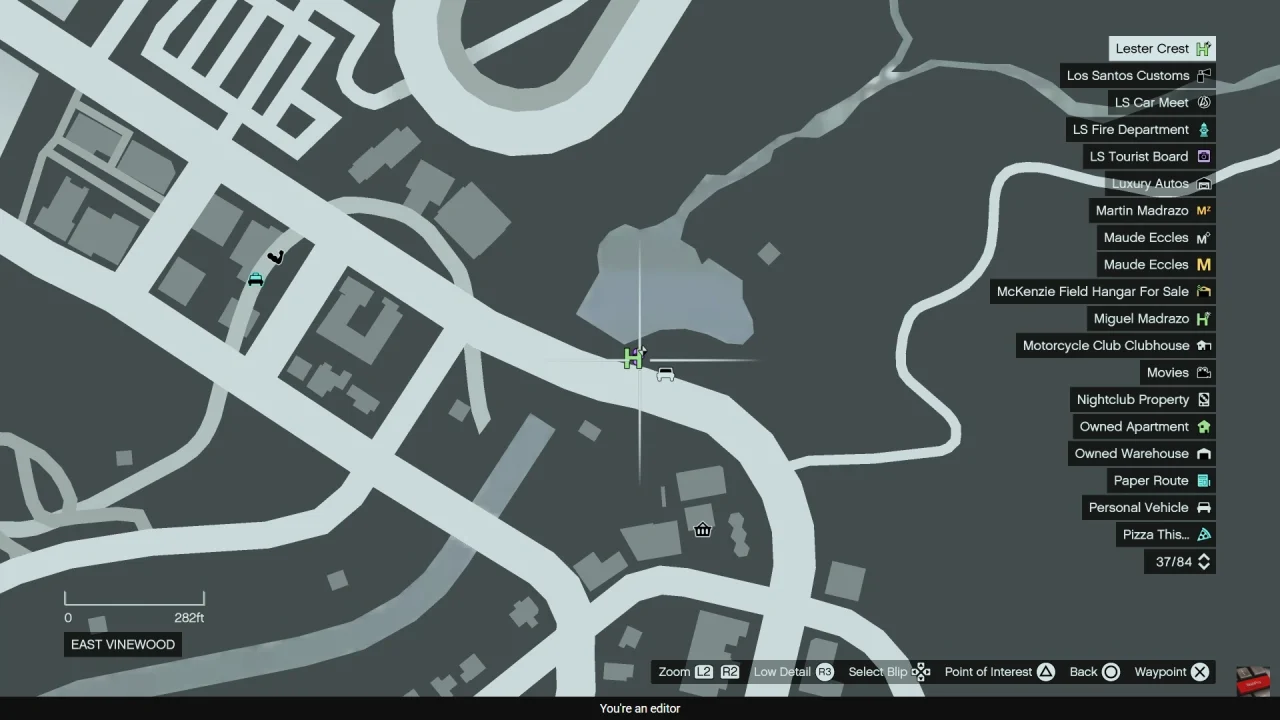
First, ensure you are a registered VIP, CEO, or MC President, as this is necessary to purchase properties in GTA Online. Next, navigate to the green marker “H” on the map and wait for a call from Lester. This unlocks the Arcade business opportunity.
After that, open your in-game phone and visit the Maze Bank Foreclosures website. Then, browse through the available Arcade locations and compare prices. Note that location affects convenience and mission efficiency.
Once you decide, select your preferred Arcade and review optional upgrades such as style, garage space, and equipment. After confirming your choices, proceed to purchase the Arcade.