In the fast-paced world of technology, smartphones have become an integral part of our daily lives. Among the various mobile platforms, Android stands out for its customization options and user-friendly interface.
If you own a Samsung Galaxy device and find yourself encountering issues with apps, resetting app preferences can be a handy solution.
In this guide, we’ll walk you through the comprehensive step-by-step process on how to reset the app preferences on your Android phone (Samsung Galaxy).
Also Read: How To Change Vibration Pattern On Android (Samsung Galaxy)
How To Reset App Preferences On Android (Samsung Galaxy)
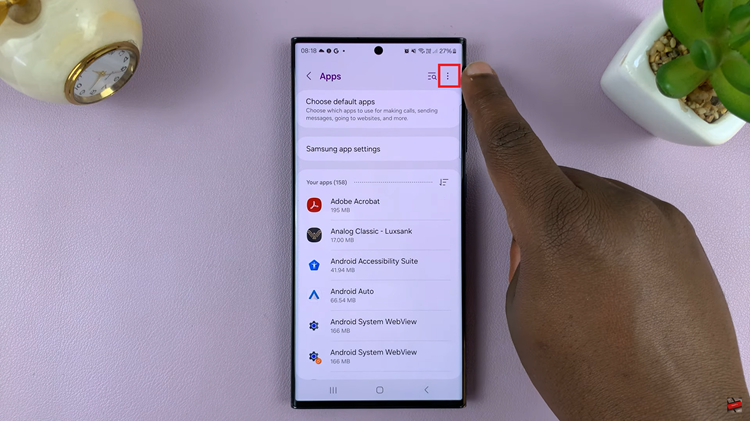
The first step is to open the Settings app. Once you are in the Settings menu, scroll down or look for the ‘Apps‘ option. In the Apps section, you’ll find a list of all your installed applications. Look for the three dots icon in the top-right corner of the screen. Tap on it to open a menu with additional options.
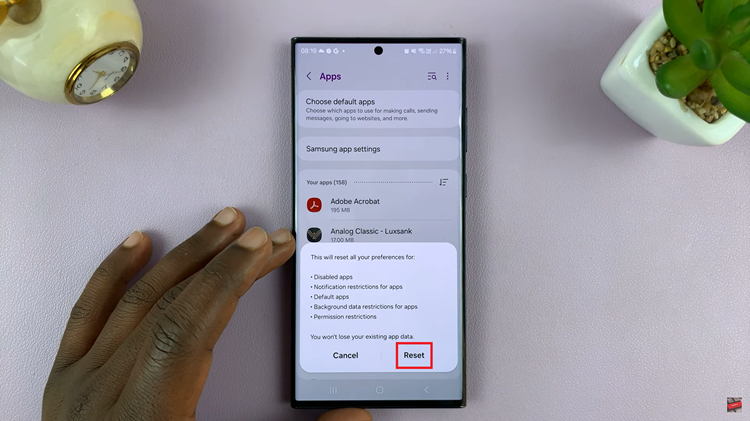
From the menu that appears, locate and select the ‘Reset App Preferences‘ option. A confirmation dialog may appear, informing you that this action will reset preferences for all apps. Confirm the reset to proceed.
Resetting app preferences on your Samsung Galaxy Android device can be a quick and effective solution to various app-related issues. Whether you are facing performance issues, app crashes, or other unexpected behavior, this process can help restore default settings and improve overall app functionality.
Watch: How To Change Photo Resolution On Android (Samsung Galaxy)