WebPro Education

Tech tips everyday
Menu
  • REVIEWS
  • HOW TO
  • TECH NEWS
  • About Us
Home
how to
Facebook
How To Share Flickr Uploads to Facebook
Facebook

How To Share Flickr Uploads to Facebook

Chris Muniu April 29, 2016

After uploading a photo on Flickr,  you ca easily share it on Facebook by clicking on the share button on the bottom right side of the photo.  But if you upload a lot of photos, this can be hectic.

You can set up your Flickr account to automatically post all your uploads to your Facebook. Sign in to your Flickr account and navigate to this page.
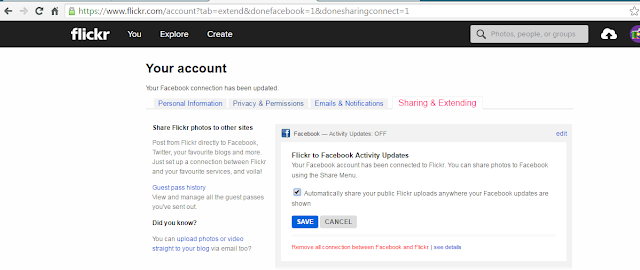
How To Share Flickr Uploads to Facebook

Click on ‘Connect’ link for Facebook.  A window will pop up from Facebook asking you to allow Flickr to access some info in your account and post for you.  Allow.

That’s it! All your uploads will be automatically posted to Facebook.

Share
Tweet
Linkedin
Reddit
Tumblr
Stumble
Whatsapp
Telegram
Email
Prev Article
Next Article

Related Articles

How To Change Your Facebook Profile Picture
Your Facebook profile picture represents you in your Facebook account.

How To Change Your Facebook Profile Picture

Your Phone Number On Facebook
Facebook has the provision of adding your phone number in …

Your Phone Number On Facebook

  • How To Update Samsung Galaxy Tab A11
  • How To Open Keyboard Settings On Samsung Galaxy Tab A11
  • How To Factory Reset Samsung Galaxy Tab A11
  • How To Enable & Disable Picture In Picture Mode On Samsung Galaxy Tab A11
  • How To Clear Cache Partition On Samsung Galaxy Tab A11
DMCA.com Protection Status

Associates Disclosure

WebPro Education is a participant in the Amazon Services LLC Associates Program, an affiliate advertising program designed to provide a means for sites to earn advertising fees by advertising and linking to amazon.com.

WebPro Education

Tech tips everyday
Copyright © 2026 WebPro Education

Ad Blocker Detected

Our website is made possible by displaying online advertisements to our visitors. Please consider supporting us by disabling your ad blocker.

Refresh