In this article, you’ll learn how to recover deleted voice recordings on Samsung Galaxy S26 Ultra. Losing important audio files can happen accidentally when you delete or clean up storage on your device. Knowing how to recover deleted voice recordings on Samsung Galaxy S26 Ultra can help you restore them quickly and avoid losing valuable information.
The Samsung Galaxy S26 Ultra provides built-in options that may help you find deleted recordings in the trash or backup storage. These recovery tools make it easier to restore files before they are permanently removed from the device.
By following simple steps, you will understand how to recover deleted voice recordings on Samsung Galaxy S26 Ultra and safely restore your important audio files whenever needed.
Watch: How To Disable Mono Audio On Samsung Galaxy S26 / S26 Ultra
Recover deleted voice recordings on Galaxy S26 Ultra:
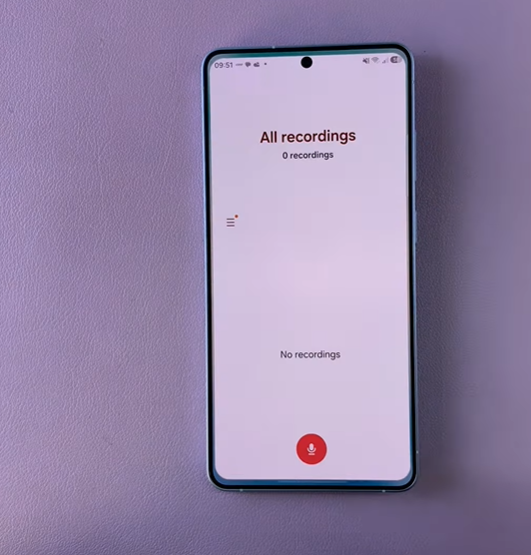
Open the Voice Recorder app on your Samsung S26 to begin the recovery process for deleted audio files. This app stores recently deleted recordings in a temporary trash folder, giving you a chance to restore important voice notes before they are permanently removed.
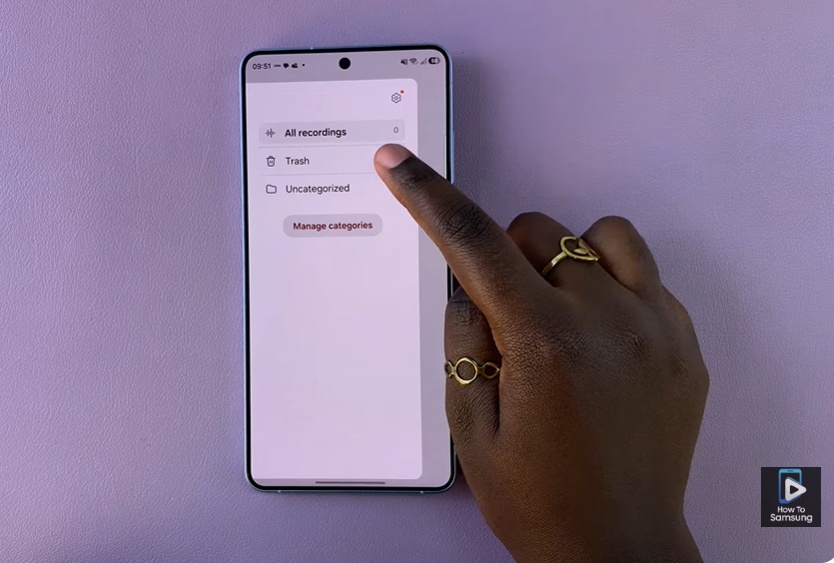
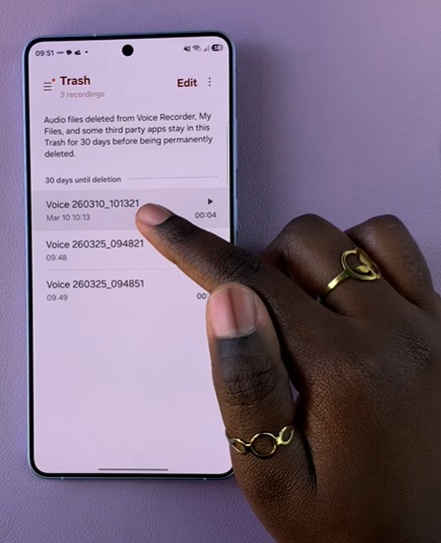
Next, access the Trash section inside the app where all deleted recordings are stored for a limited time. Here, long-press the voice recording you want to recover and review it to ensure it is the correct file. Finally, tap Restore to return the recording to your main list, making it available again for playback or sharing.
Recover deleted voice recordings on Samsung Galaxy S26 is a simple process when you know where to look. With these methods, you can recover deleted voice recordings on Samsung Galaxy S26 and avoid losing valuable information. Always check the trash or backup options first to increase your chances of successful recovery.
Read: How To Turn ON Live Captions On Samsung Galaxy S26 / S26 Ultra